
IN THIS ARTICLE:
What are the different section I can edit on Employee home page?
Once you have installed Employee Home Chrome extension in your browser, you can access Employee Home page by opening a new tab. As an Admin, you can click on the gear icon of the logo in Employee Home and upload your own company logo, and customise the color scheme. You can also add links and documents to the Resources section on the right-hand side.
Who all can edit/configure Employee Home different sections’ settings?
As of now, only super administrators in Rippling have permission to edit company logo, color and edit resource section.
How do I invite employees to install Employee Home?
You can invite your employees to Employee Home by following the installation steps here:https://app.rippling.com/employee-home/setup
We suggest to install the Employee Home app but do not send the invitations in the Send Invitation step. Try it out first. Then you should send invitation step (after installation) here:https://app.rippling.com/employee-home/invite-employees to send the invites to everyone.
Employees can also download the Chrome Extension directly from Google’s Chrome Web Store here.
What different sections I can edit in Employee home page?
As of now, only birthday section can be turned off on employee home pages. But section like New Hires, Water cooler, work anniversaries and Out of office can not be turned off. You can also see Vacation type when you hover over vacation dates on the page.
We have birthdays at our company, but it’s not showing up on our homepage. Do you know why?
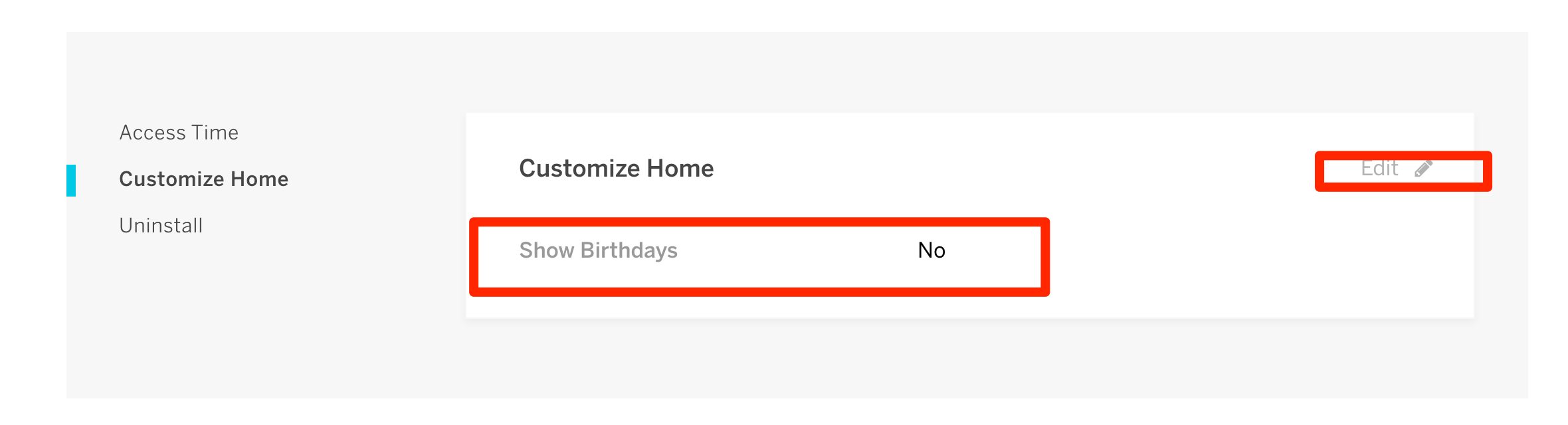
Birthday information comes under sensitive information which is why we keep this hidden by default, you can turn it on by going to Employee home app in your Rippling Dashboard >> Settings >> Show birthdays –> Yes.
This will enable showing upcoming birthdays on your Employee home page.
Can I force log out Employees from Employee Home?
Currently this is not configurable, but we force log out employees from Employee Home once in a month. Once we add support for this, we will update here.
What different browsers Employee Home is supported on?
Employee Home is currently available only as chrome browser extension. It does not support any other browsers or mobile application yet.
Comments
0 comments
Please sign in to leave a comment.