
At the beginning of the year, employees that received taxable income in the prior year will receive a W2, or a Wage and Tax Statement, from their employer so that they can file their taxes.
IN THIS ARTICLE:
How do I access W2 in Rippling?
W2s are available in the payroll app or within the Employee’s profile under Payroll → W2s.
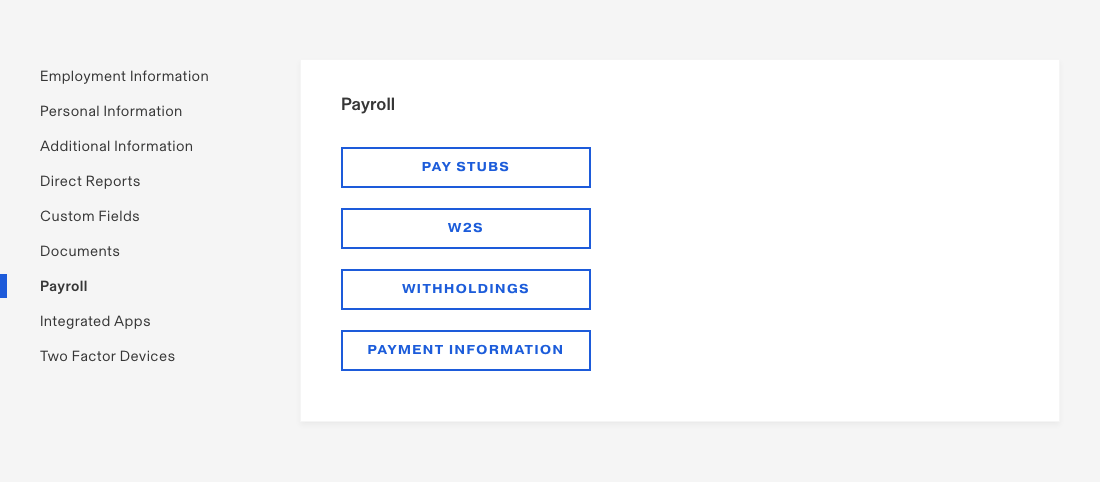
How can I have my W2 sent to me?
W2s are issued electronically through Rippling.
When should I receive my W2?
You should receive your W2 prior to the January 31st deadline. You will receive an email from Rippling to let you know when your W2 is available.
Why are there multiple copies of my W2?
The employee receives three copies of Form W2: one for their own record, one for the federal tax return, and one for the state tax return. Form W2 must be attached to both the federal and state returns; this is to help support claims of tax withholding (see the question below for more information).
Why did I receive 2 different W2s?
You may receive 2 different W2s if you worked in multiple states in the same year. Sometimes, these are broken out into two different W2s.
What is a W2C?
A W2C is Correct Tax and Wages Statement Form. This form is used if there was an error in filing the initial W2.
The Social Security Number, name, and/or address on my W2 are not correct, what can I do?
The Social Security Number and the name on the W2 must match the Social Security Number and name on your Social Security card. If they do not, then the W2 is incorrect, and you may need a W2C (corrected W2) after your payroll records are updated by your company admin.
A W2C is not, however, required for a change of address. If the address is wrong or outdated on your W2, you are encouraged to correct your address in your Rippling profile as soon as possible. However, a corrected W2 is not required for a change of address and it won't be issued.
Comments
0 comments
Please sign in to leave a comment.